Basic commands
Tutorials on YouTube
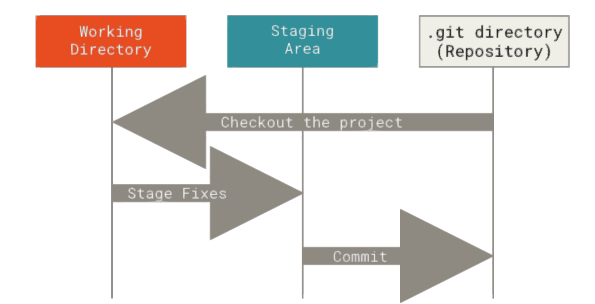
files go from a map to STAGED to GIT
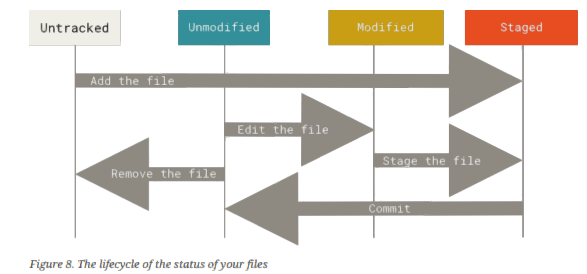
Git Commands
git status - get status
git log - get a log of actions
git add file1 [file2 ... ] - add a file to be tracked by git (staged)
git commit -m "Commit message" - store all modified and staged files in the repository
git add . - add all files to be added, think of it as: “add precisely this content to the next commit”
git restore --staged <file> - to remove a file from the staged area
git checkout <commit-hash> - checkout a previous commit
git checkout master - get back to latest commit
Branches
A timeline
git branch <new-branch-name> - start a new branch (create a side-timeline)
git branch - list branches
Merging
git merge <branch> - merge from branch in master
example: git merge crazycolrs
git status -s - short form of status
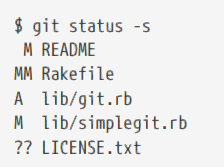
Left column: STAGING AREA
Richt Column: STATUS OF WORKING TREE
Rakefile: modified + staged + modified-again
LICENCE.TXT: not under version control
Ignoring Files
.gitifnore files
Example
# a comment in the .gitignore files
*.[oa] // files ending in "o" or "a"
*~ // files ending in "~" (temp files)
dddd/ // to specifiy a directory
/dddd // to avoid recursion
!nnnn // negate a pattern
git diff - show the actual differences
git diff --staged - show the actual differences btw stages and repository (shows what you are about to commit)
git diff --cached - same as --staged
git commit - will open an editor (use Esc shift-Z shift-Z to save and exit??
Committing files with skipping the Staging step
git commit -a -m "message" - commits all files under version control. No need to add first.
Removing a file that is accidentially cached
git rm --cached README
$ git rm log/\*.log - remove all log files drom log dir. /\ is required excape for the \ in path
Undo chenges
git commit --amend // undo the latest commit
Created with the Personal Edition of HelpNDoc: Free PDF documentation generator